For ComfyUI work please scroll down.
3D+AI Workflow
UE Previs
Ue Ref
Output

Env built inside UE:

Codex restyle for Env sheet

UE render-codex

Codex Pass

fully generated shot:

camera motion was created in Unreal Engint 5:

character motion was created using video to mocap workflow.

start frame iteration examples


start frame generation:

photoshop polish pass:


Separate take with framing adjustment in prompt:

Start/End Frame Examples
(ComfyUI style frames are below)
fully generated shot:

Start frame for this shot was generated using numerous tools. While most image models are capable, a strong eye for art direction / strong prompting is still important to avoid slop.
start frame used:


earlier version vs final version

pre polish
final pass
some of the tools used for polishing generated start frames:


and various image to image models.
In this case, specific direction was given around lighting, color composition, shadow quality, use of blur, camera and lens choices, film characteristics, and other visual details.
As you can see, there is a significant difference between what the engine initially made and what ultimately became useful.
character / env reference sheet generated:

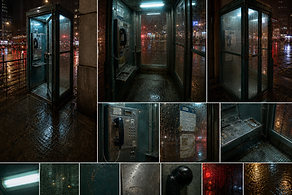
references I often use in communicating shot detail: (shotdeck)

some more start image work examples:

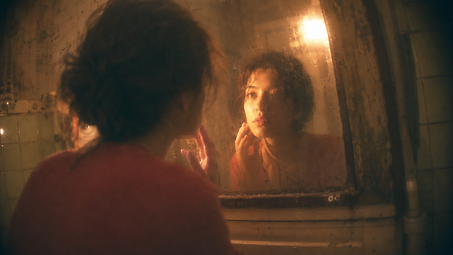


prompting
Examples of master prompts/agent guidelines for automation


-
prompt_format.md
-
visual_style_prompt.md
-
character_sheet_prompt.md
-
environment_sheet_prompt.md
-
jimeng_upload_guide.md
Similar to prompting for starter image, shot prompting takes a strong eye for animation and film knowledge as well. Often times a generic prompt lacking guidance will result in souless or "floaty" action.
full gen shot example:
The contrast between the characters’ mental states is achieved through prompting. Her emotional absence is contrasted with his attentive presence.
automation / prompting


An agentic workflow helps with iterating starter images as well as brainstorming ideas.
I ask a contact sheet to be generated for my review every morning.

ComfyUI Custom Nodes / Workflow Examples
These custom nodes are designed to streamline production workflows for the VACE model, addressing its limitations that can create production bottlenecks.

These nodes are then used in a production-ready custom workflow that enables the VACE model to process videos beyond its native limitations, including frame-count and divisibility constraints.

Here’s a closer look at the KSampler setup. Multiple KSamplers are daisy-chained with overlapping frames to maintain contextual consistency.

Here's an example that uses this workflow:
Imperfect result with Seedance:

Photoshop fix for single frame as input context


Vace pass:

Comped Output(UHD):
Video to Mocap:


Unreal Example Scene used (from fab)

UE Scene AI re-render:(Enhanced realism for env sheet)

Scene Setting Exploration:


ComfyUI Custom Workflow Examples
Top: Original plate.
Bottom: Final result created in ComfyUI, After Effects, and Nuke.

^The clean plate was then be used for additional vfx.
styleframes example for the same project (communication with client):


Earlier pass
Final look used
these example show iterations of a shot styleframe.
These are used for communication with clients to make sure they are satisfied incrementally with the direction of the project.
Feedback were given on:
1. Smoke amount/look/animation
2. Rocket shape/timing
masking | bg removal/compositing for masking:


controlnet: depth, pose | bg_removal
plate:

Reference frame:
(created with firefly, comfy, nuke/ae)

Mask:

Mask comp:

pose estimation tracked onto plate:


lora | modeling
LTX trainer / claude / fine-tuning models
The custom workflow below uses techniques like Controlnet, masking, diffusion adjustment, LoRA conditioning, inpainting, and latent upscaling to drive AI generation.

Workflow for locally generating quick relighting ideas.

The custom workflow below uses techniques like Controlnet, masking, diffusion adjustment, LoRA conditioning, inpainting, and latent upscaling to drive AI generation.

Upresing with topaz

Relighting
On My Mind By Rosé and Alex Warren
As the lead vfx artist on this project, I delivered using both traditionally rendered and AI generated images. A workflow that uses AI generated 3d model was used to match vfx with on set scenes.
Full video:
Some examples for how I implemented AI models and hand-created models.

Start/end frame, prompt engineering, etc. AI generated clips were pased to comp artist for final touches.
Traditional 3d workflow:
Here's an example of a shot that used a more traditional 3d vfx workflow. Assets were either generated, hand created, or imported from quixel.

Created in maya, lit and rendered with redshift, and comped by comp artists in nuke.


Fully AI Generated Commerical Assets (Early versions)
Seamless made to look like one long shot.
Seedance(Jimeng), Kling, Veo, etc. The clip was then polished using ComfyUI, after effects, or nuke.
The seamless stitching was created using various methods like forcing motion blur and vid-to-vid gen in Seedance.
These shows the plate with no audio, text, or any graphics.

The entire commercial is one seamless shot, combined together with over 10 individually generated AI shots.


Much of my ComfyUI work is under NDA. Please reach out for latest details. Leoligen@gmail.com
File Management, Naming Conventions, and a Note on Professionalism
File management and a clearly established naming convention are crucial in any collaborative environment, especially when working with version control systems on larger commercial productions.

Professionalism:
Working as an artist on commercial projects means receiving feedback well, adapting quickly, and making the process as smooth as possible for everyone involved. Collaboration and creating a supportive working environment are central to my professional practice.